 Search
  1-844-PUSHPAY
 Best church apps [2026]: Features, platforms, and what to look for
Pushpay, Planning Center, Subsplash — which church app is right for you? Here are the 10 features that separate the best options from the rest.
The short answer: Pushpay, Planning Center, and Subsplash are the three platforms most churches are choosing between right now. Pushpay’s MyChurch App and Custom App live inside ChurchStaq, which makes it the strongest choice if you want giving, church management, and your app to share data without any manual reconciliation. Planning Center leans into volunteer scheduling and ease of use but doesn’t have a standalone, white-labeled app solution for your church. Subsplash has a strong reputation for polished app design and media delivery. All three are legitimate depending on where your church is operationally.
Picking a platform is the easy part, though. The features inside it are what determine whether your app becomes a genuine engagement tool or a bulletin board nobody opens after Sunday.
Most app demos show you a polished homescreen. What they skip past is what happens when a first-time guest tries to check in their kid from the parking lot, when a mid-week push notification goes unread, or when your finance director needs to reconcile a weekend’s giving without bouncing between tabs. That’s where the real differences show up — and where a lot of churches realize, about 18 months in, that they bought the wrong thing.
The 10 features below are the ones worth scrutinizing before you sign anything.
1. Sermon integration
Having an app that’s able to serve up audio or video of your sermons is a must. It gives people an opportunity to brush up at home on what they learned on Sunday morning, and to stay up-to-date when they can’t make it. It’s also a great way for people to get to know your church before they ever attend.
2. Digital bulletins
You might be thinking that having a church app is an unnecessary expense, but consider this: A church of 200 spends about $150 a week on full-color bulletins—that’s $7,800 a year! That’s a lot of capital spent on something that’s stuck in a Bible or thrown on the floor of someone’s car. It’s so much more effective (and efficient) when the people can use the bulletin on their phones.
3. Integrated events
If you want to put on a conference or a concert, it would be ideal if you could do it all from your church’s app. You could organize, promote, and even take registrations in the app. After all, the great thing about having an app is being able to bring all of your church information and services together.

4. Blog and podcast feeds
If your church has an online platform, like a blog or podcast, you don’t want people to have to go anywhere else for it. You want them to be able to open the app and jump right in! In fact, if you have an app, a blog in the form of a daily devotional could be a good way to get your congregation into the app regularly.
5. Push notifications
Have an important meeting, potluck, bible study, or event coming up and you don’t want people to forget? Push notifications allow you to remind people—even when they’re not actively using your app.
6. A church calendar
We often use church bulletins as a way to remind people of upcoming events on the church calendar, but they get thrown away so it doesn’t work too well (see point #2). Imagine if you could just make your church calendar public—and everyone just had it in their pocket!
7. Customizable options
You want your custom church app experience to represent your church well. So not only does it need to be branded, but it also needs to have exactly what you need—and nothing else. You need to be able to decide what your experience looks like, what information it includes, and how it operates.
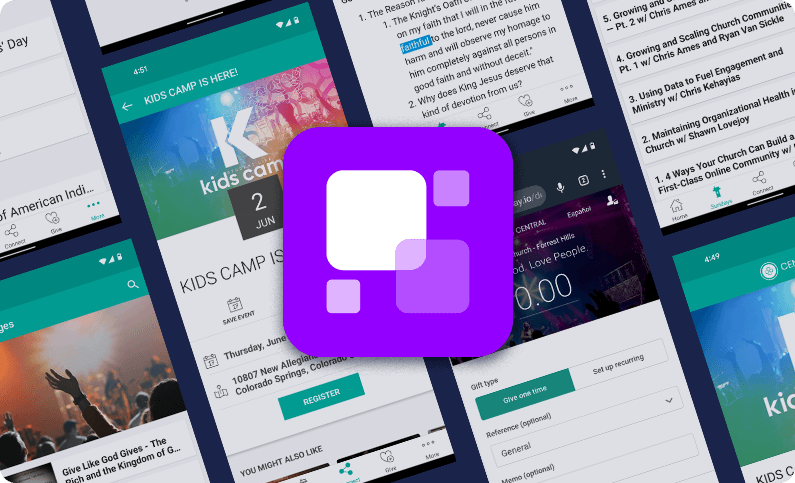
8. A mobile giving solution
Roughly 76% of U.S. adults have made a purchase from their phone, and most retail web traffic now comes from mobile devices. The bar your giving experience is being measured against isn’t another church platform. It’s whatever app your donors used to order coffee that morning. (For more on what to look for in a church giving solution, you can read more here.)
9. Advanced analytics
To have an app that’s getting used well, you need to know how people are using it. Analytics allow you to see what functions people use the most, when, and for how long. This allows you to make changes to serve your congregation better.
10. Social media integration
If someone is enjoying a sermon or is excited about an event, you want to give them the ability to share that information with their friends on social media! Social media integration is nonnegotiable.
Frequently asked questions about church apps
What are the best church apps in 2026?
The three platforms most churches are actively choosing between are Pushpay, Planning Center, and Subsplash. Pushpay’s MyChurch App and Custom App are built into the ChurchStaq platform, meaning giving, church management, and the app share a single data layer. Planning Center excels at scheduling and people management but doesn’t offer a white-labeled standalone app. Subsplash leads on media delivery and design polish. The right choice depends on whether your priority is integration, ease of use, or content experience.
What features should a church app have?
At minimum: mobile giving, push notifications, sermon content (audio or video), a church calendar, event registration, and app analytics. Beyond that, the features that tend to make a real operational difference are integrated child check-in, volunteer scheduling within the app, and group messaging — because those are the things that turn an app into something people actually open during the week, not just on Sunday morning.
How does Pushpay’s church app differ from other platforms?
The main differentiator is the integration story. Pushpay’s app connects directly to the ChMS and giving platform, so when someone gives through the app, that data flows into their member profile automatically. There’s no separate sync, no manual reconciliation. Pushpay also offers a LEAD App specifically for church staff — a mobile ChMS in five languages — which most competitors don’t have.
Does a church app need to include mobile giving?
Yes, and the tighter the integration, the better. An app that links out to a separate giving page creates friction; a fully embedded giving experience keeps the transaction in one place. Recurring gift setup, giving history, and fund designation all work better when giving lives inside the app rather than redirecting to a browser.
Can a church app replace printed bulletins?
Practically, yes — and the cost argument is real. A church of 200 printing full-color bulletins spends around $7,800 a year. A digital bulletin in your app is updated in real time, doesn’t get left in the pew, and can include links, registration forms, and giving prompts that a paper bulletin obviously can’t. The honest caveat: adoption takes intentional promotion, especially with older demographics. The app doesn’t replace the bulletin the week you launch it.
What’s the difference between the MyChurch App and a Custom App?
MyChurch is Pushpay’s consolidated app — your church gets a presence inside a shared app environment, which is faster to launch and lower cost. The Custom App is a fully branded, standalone app in the App Store and Google Play under your church’s name. It includes everything in MyChurch plus a dedicated homescreen, deeper customization through App Studio, and a drag-and-drop builder your team can update without any coding. Most mid-size and larger churches choose the Custom App for the branding and the homescreen control.
The Pushpay app has you covered!
When you get your church app from Pushpay, you get all of these essential functions—and more. They’ll even walk you through an integration strategy to help get your church to use the app regularly.